Student Early Support
The student who needs an adult today is rarely the one making the most noise.
Attendance tells you who’s here. WellSeen helps you understand how they’re arriving — and makes sure someone actually follows through.
Maya R. · 8:40 AM
On her way into Room 12
Asked for an adult
One tap · 8:41 AM
Elena Reyes
School counselor · 8:43 AM
9:02 AM
Follow-up set for tomorrow
- Students check in on the way into class — about 10 seconds, no typing.
- Support staff know the moment a student asks to connect.
- Every request is assigned and followed through.
Students arrive carrying things no one can see from the front of a classroom — a grandparent in the hospital, an argument at home that ran until two in the morning, a friendship that ended on the bus. Sometimes something much heavier. Almost none of them will walk into an office and say so on their own. Asking for an adult is the bravest thing a student can do, and WellSeen’s whole job is to make it small enough to actually happen.
How it works
Five steps, on an ordinary school morning. Most tools stop at telling an adult something might be wrong. WellSeen keeps going until someone has actually sat down with the student.
It starts at the WellSeen Classroom Kiosk — a tablet in a secure stand, mounted by the classroom door, so checking in is simply part of walking in.
See what comes in the package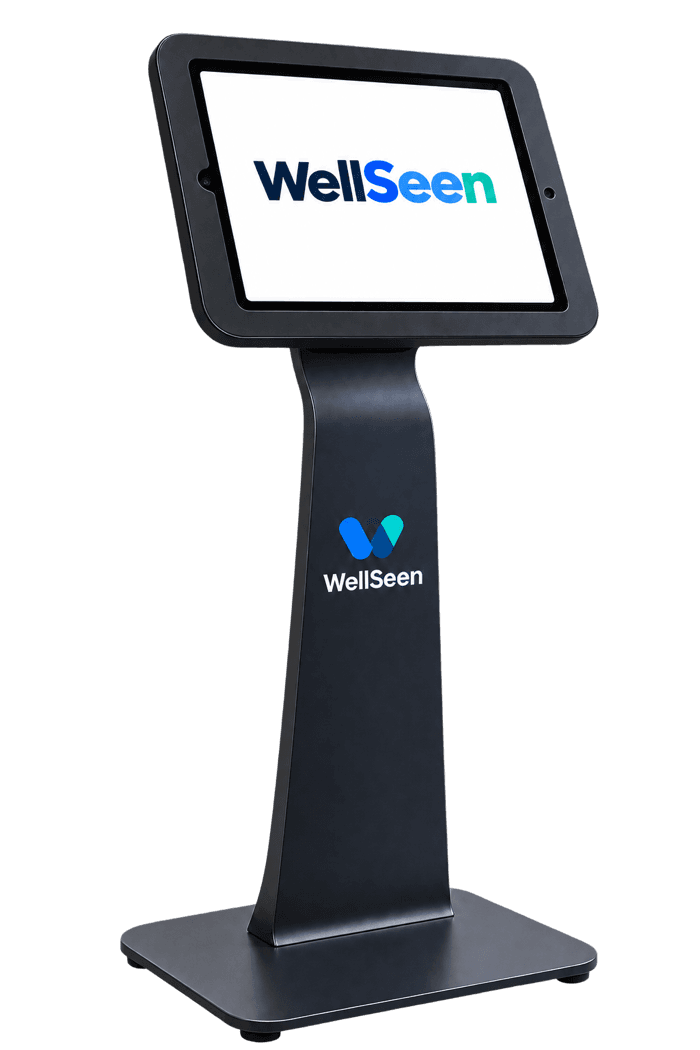
- 01A student checks inOn the way into class, a tap on the kiosk by the door: how are you arriving today? About ten seconds, no typing.
- 02They can ask for an adultOne more tap asks a trusted grown-up to check in with them — no hand raised, nothing said out loud in front of the class.
- 03The right staff see itCounselors and support staff see the request straight away. Teachers see that a student asked — never what they chose or said.
- 04A named person takes itNot a shared inbox: one adult, by name, responsible for reaching that student. The conversation itself is human, as it should be.
- 05It closes, or it comes backEvery request ends resolved or scheduled to return to, with an owner attached until it does. Nothing quietly falls off a list.
What WellSeen will never do
WellSeen will never diagnose a student, rank them against classmates, predict a crisis, watch them, contact anyone on its own, or sell a thing about them.
Most of these things are already for sale to schools somewhere. We built WellSeen so it can’t do any of them — a school shouldn’t have to run on a vendor’s promise.
Software can help a school notice. What a change means — and what happens next — is always a person’s call.
Never diagnoses a student or suggests one
It puts what a student chose to share in front of a person, so a conversation can happen. Naming what a student is going through is work for people, not software.
Never scores, ranks, or rates students against each other
A student is only ever compared to their own usual pattern — never to the rest of the class, and never to a discipline file or a gradebook.
Never predicts crisis, self-harm, abuse, or neglect
Everything it can ever show an adult is something that already happened — a check-in a student made, a request they raised — never a forecast about a child.
Never watches faces, cameras, microphones, location, social media, or devices
Everything it knows about how a student is doing, the student chose to share at a check-in.
Never notifies a parent or contacts police on its own
A request reaches a named adult at your school, and your district's own protocol takes it from there.
Never sells student information, uses it for advertising, or trains AI on it
Student data has one job here: helping an adult follow through. It is not inventory, and it is nobody's training set.
When a student says they need someone
The whole thing, minute by minute — one student, one ordinary morning, from the tap to the follow-up.
WellSeen never decides that a student is in trouble. It has no way to know that, and it will not pretend otherwise.
The student decides. And from the moment they do, the entire point of the system is that the next twenty minutes are not left to chance.
Then your crisis protocol runs, exactly as it does today, written by the people in your district who are licensed to write it. WellSeen does not detect emergencies and does not route them. What it does is put a trained adult in front of a student in minutes instead of days — and leave a timestamped record of when the student asked and who answered.
8:41 AM
Maya asks for an adult
One tap at the classroom device, on the way in. No form to fill in, no reason required, and nothing she has to say out loud in front of her class.
8:41 AM
The people who should know, know
Support staff for Maya's school are notified the moment she asks — not at the end of the period, and not by a note that has to travel through three adults first.
8:43 AM
A named person takes it
Elena Reyes, school counselor, now owns this request. Not a shared inbox and not a queue somebody eventually gets to — a person, by name, who is accountable for it.
9:02 AM
The conversation happens
A trusted adult — counselor, school psychologist, social worker — sits down with Maya. That part is human and always was. WellSeen's job is that it happened today rather than next week.
Before the day ends
It closes, or it comes back
Resolved, or scheduled with a date and an owner. A request cannot quietly expire, and nobody has to remember it on their own.
Who can see what a student said
Two people looking at the same support request, at the same moment. One of them can see what Maya chose that morning. The other cannot, and never could.
Elena Reyes
School counselor
Sees what Maya chose
- Assigned to Elena Reyes · 8:43 AM
- Connection made by Elena Reyes · 9:02 AM
Visible to counseling and admin
- Arriving
- Having a hard day
- Wanted to share
- Home
Marcus Doyle
Teacher, Room 12
Sees only that Maya asked
- Assigned to Elena Reyes · 8:43 AM
- Connection made by Elena Reyes · 9:02 AM
Not visible to teachers
What Maya chose at check-in is not shown here.
Same student, same request, same status, same named owner. The only difference is the one block that matters — and it is the database that withholds it, not the screen. A teacher’s account receives no check-in rows at all.
Built for the questions your privacy officer will ask
Not a policy page. These are properties of the system, and each one has a test behind it.
Teachers see that a student asked — not what they said
Enforced in the database, not the interface. A teacher receives zero rows of check-in content, and there is a test that proves it.
Families can decline, and it actually works
A guardian's refusal removes the student from the check-in device entirely. Their name never appears; no check-in can be recorded for them.
The device holds nothing
Answers live on the server for as long as the check-in takes. Nothing is cached on a shared classroom tablet for the next student to find.
What a district actually gets
A check-in tool nobody uses is worth nothing, so the things that decide whether it gets used are part of what we hand you — not a line item you have to go and fund somewhere else.
The devices, if you want them
A classroom tablet, mounted by the door and locked to the check-in screen. Use your own hardware if you have it — but a district without a device budget or a spare IT project should not have to start one to try this.
Wellbeing materials for every classroom
Focus breaks, calming exercises and classroom resources, included with the platform. Available to every student and every teacher — and never assigned to a particular child because of what they chose at check-in.
Reporting on the two things that matter
Whether students are using it, school by school — and the number almost nobody shows you: how long a student who asked for an adult waited before one arrived, and how many follow-ups actually closed.
We sponsor the celebration
A classroom party, an end-of-year event — for schools where students who ask get answered. Never for hitting a check-in percentage: a participation target quietly turns one child's decision not to take part into everybody's loss.
Every student deserves to be well seen.
Tell us a little about your district and we’ll walk your team through the whole loop — the student side, the counselor side, and exactly what a teacher can and cannot see. Bring your privacy officer.